Short answer: hair flicker is the alpha matte changing between frames, not the hair moving. In a 36-frame test, the default 22%/3% key dropped 27 of 28 thin strands below half opacity; edge alpha missed true coverage by 93 levels. A tighter 12%/8% key kept all 28 strands and cut that error to 66. Tolerance alone cannot fix it — a locked key colour and a softer ramp can.
What this test is
I built one 480×360 frame with a head, skin, and 28 hair strands between 0.7 and 2.2 pixels wide. The subject moves by ±0.16 pixels, the amount a tripod shot still moves when someone breathes, and every frame gets sensor noise of σ 4 levels per channel. Coverage is rendered with 4×4 supersampling, so the true alpha of every edge pixel is known before the key runs. The key is the exact formula this site's browser keyer uses: Euclidean sRGB distance from the sampled colour divided by 441.6729559, alpha 0 below tolerance, then a linear ramp across the softness width.
| Test parameter | Value |
|---|---|
| Frames | 36 at 480×360 |
| Hair strands | 28, 0.7–2.2 px wide |
| Subject motion | ±0.16 px sub-pixel |
| Sensor noise | σ 4 levels per channel |
| Backdrop | #00b140 |
| Stable edge pixels measured | 1,482 |
This is a synthetic test, not a camera test. That is deliberate: a ground-truth matte is the only way to separate real hair movement from keyer error. No claim here depends on a particular camera, lens or codec.
What the matte does over 36 frames
A single frame hides the problem. Both mattes below look plausible; the difference is in time. The right-hand heatmaps show where alpha disagrees with the true coverage, frame after frame.
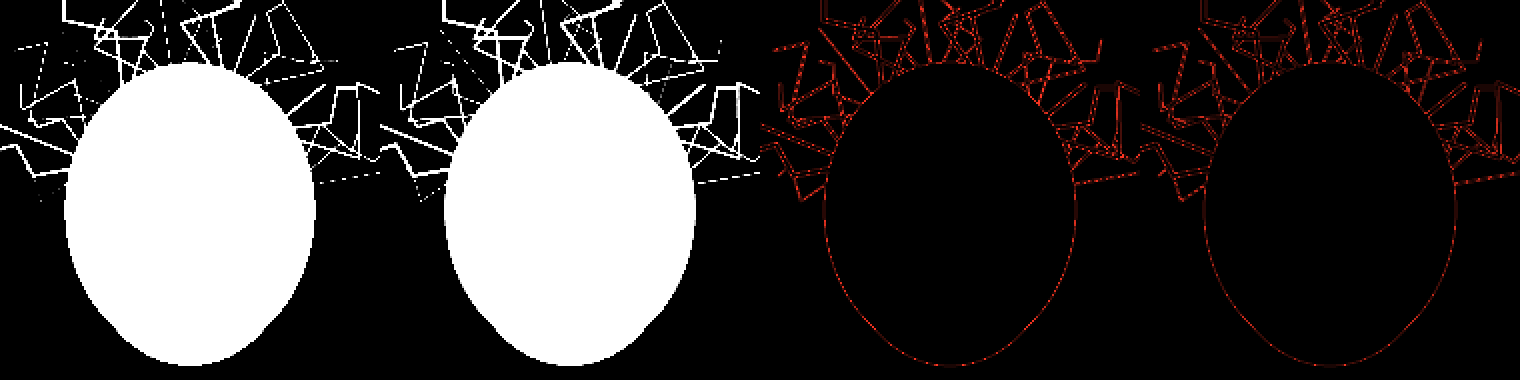
| Key setting | Strands lost (of 28) | Mean alpha error | Error std | Median-3 error std |
|---|---|---|---|---|
| 22% / 3% (site default) | 27 | 92.8 | 49.3 | 45.3 |
| 16% / 6% | 26 | 70.6 | 45.0 | 41.3 |
| 14% / 8% | 17 | 63.9 | 40.0 | 36.5 |
| 12% / 8% | 0 | 66.3 | 39.1 | 35.7 |
| 12% / 10% | 1 | 58.4 | 35.3 | 31.9 |
| 10% / 10% | 0 | 63.7 | 34.3 | 31.1 |
| 8% / 10% | 0 | 73.2 | 32.8 | 30.1 |
| 28% / 3% | 28 | 123.8 | 29.5 | 27.3 |
Strands lost = a strand whose centreline had true coverage of at least 120/255 in a frame but keyed below 64/255 in that same frame. Mean alpha error = mean |alpha − true coverage × 255| over 1,482 stable edge pixels × 36 frames. Error std = the same pixels' temporal standard deviation. Median-3 = the same error std after a three-frame temporal median.
Read the first and last rows together. The site default loses 27 of 28 strands; the 28% setting loses all 28 and posts the lowest error std. That is the trap: a key that deletes the hair is perfectly stable and completely wrong. Its mean alpha error is still 123.8 levels, the worst in the table.
The 12% row is the knee. A 50/50 blend of hair #2a1f1a and backdrop #00b140 sits 17.75% from the key, because the hair is 35.5% away and the blend is half that vector. At 22% tolerance that pixel is inside the net, so alpha is 0. At 12% tolerance with 8% softness it becomes 183 — the strand survives. That single calculation explains why the default is wrong for hair and why a lower tolerance is not just a cosmetic tweak.
Why the edge boils
Four things change the matte from frame to frame, and only one of them is the hair itself:
- Sub-pixel coverage. A 1 px strand that moves 0.16 px changes a pixel's coverage from, say, 0.45 to 0.61. The true alpha moves by 41 levels. That part is real.
- Sensor noise. Four levels of noise per channel move a borderline pixel across the tolerance threshold. At 22%/3% the ramp is narrow, so a small distance change becomes a large alpha jump.
- Per-frame keying. Every frame is solved independently. The keyer has no memory of the previous frame, so it cannot tell a real change from noise.
- Compression. A video codec smears green into the strand and then quantises it. The next frame smears it differently.
The measured table below separates the last two. Auto-key drift is what happens when the key colour is re-sampled every frame instead of locked once.
| Test (22% / 3%) | Key drift | Mean alpha error | Error std | Frames with step > 32 |
|---|---|---|---|---|
| Locked key colour | 0 | 92.8 | 49.3 | 19.9% |
| Auto key, 1-pixel sample | 1.43% | 93.1 | 51.9 | 21.2% |
| Auto key, 9×9 average | 0.15% | 93.2 | 49.3 | 19.7% |
| H.264 CRF 18, then key | — | 106.2 | 33.1 | 11.8% |
| H.264 CRF 28, then key | — | 109.7 | 30.7 | 6.2% |
Key drift = mean distance of the per-frame sampled colour from its own average, as a percentage of the 441.67 divisor. Frames with step > 32 = share of edge-pixel/frame pairs where alpha changes by more than 32 levels from the previous frame.
The 1-pixel auto key adds 1.43% of key drift and raises the error std from 49.3 to 51.9. A 9×9 average cuts the drift to 0.15%, but the larger fix is simpler: sample one clean patch on the first frame and use that exact colour for every frame. The compression rows are the counter-intuitive ones. CRF 28 lowers the frame-to-frame step to 6.2% and the error std to 30.7, yet raises the mean alpha error to 109.7. The codec has blurred the strand into the green, so the key is steadier because there is less hair left to flicker. A steady matte is not automatically a good matte.
Settings that survive fine hair
- Sample once, then lock. Pick a clean backdrop patch on the first frame, note the hex, and use the same value on every frame. Do not let an auto key re-sample per frame; the measured 1-pixel drift is 1.43%.
- Start at 12% tolerance and 8% softness. On this test that kept all 28 strands and cut the mean error from 92.8 to 66.3. If the edge still pops, try 12%/10%; it posted the lowest error (58.4) among settings that keep at least 27 strands.
- Do not raise tolerance to chase the flicker. 28%/3% is the most stable row and the worst matte: all 28 strands gone, 123.8 levels of error. Lower tolerance and wider softness is the direction, not higher tolerance.
- Despill after the key. A strand kept at 12% still carries green in its colour. The alpha can be right while the edge is green; that is a separate step, covered on the spill page.
- Try a three-frame temporal median last. It lowered the error std from 49.3 to 45.3 at 22%/3% and from 39.1 to 35.7 at 12%/8%, but it cannot restore a strand that the key deleted in every frame. Fix the key first, then smooth.
This page is an explanation, not a video tool. The browser keyer on this site keys one still frame and exports a PNG; it does not decode an MP4, and it will not pretend to. Use it to sample the colour and inspect one frame, then apply the same locked values to a frame sequence. The export and container workflow is on green screen remover for video.
Green screen remover hair FAQ
Why does the hair edge flicker even when the subject is still?
Because the subject is never perfectly still at pixel scale, and the key is a threshold. A 1 px strand moving 0.16 px changes its coverage in a pixel by about 16 percentage points, and sensor noise moves the colour distance too. On a 3% softness ramp those small changes become tens of alpha levels. In the test the default key missed the true coverage by 49 levels of temporal standard deviation. The same mechanism is behind the classic complaint that blonde hair and blue eyes turn partly transparent on a green key: the mixed pixels near the threshold are doing the flickering, not the whole strand.
Question source: Video Stack Exchange 10702, where an editor reports blonde hair and blue eyes becoming partially transparent after a green-screen key.
Does edge softness or feathering stop the flicker?
No. Softness and feathering are spatial: they spread the alpha ramp across colour distance inside one frame. They make a hard staircase look softer, but they do not know what the previous frame looked like. In this test, dropping tolerance to 16% and raising softness to 6% still left 26 of 28 strands dropping below half opacity at some point, with a 45-level error std. Feathering can make each frame prettier; it cannot make two frames agree.
Question source: Video Stack Exchange 5040, where the asker describes an unevenly lit key and asks what options can improve it.
Does raising tolerance stop the flicker?
It can make the matte steadier by deleting the thing that was flickering. At 28% tolerance the error std fell to 29.5, the lowest in the table, but all 28 strands dropped below half opacity and the mean error rose to 123.8. That is not a fix; it is a quieter failure. If the goal is hair that stays visible, the useful direction is lower tolerance plus a wider softness ramp, then despill.
Why did H.264 make the matte steadier but worse?
Because compression blurs the strand into the green before the key sees it. The colour becomes more uniform, so the threshold flips less often: at CRF 28 the frame-to-frame step fell to 6.2% and the error std to 30.7. But the mean alpha error rose to 109.7, worse than the uncompressed 92.8, because the hair itself has been contaminated. The same chroma loss is why 4:2:0 footage is a poor source for fine hair; the colour channel is stored at half resolution before any key runs.
Related question: Video Stack Exchange 32485, on whether 8-bit 4:2:0 is good enough for chroma key.
Can I test this with the browser keyer on a still frame?
Yes, for one frame. Drop a PNG or JPG into the browser keyer, sample a clean patch of the backdrop, and try 12%/8% against 22%/3%. Look at the alpha, not the checkerboard: the matte should keep the strand continuous, and the subject's solid areas should stay fully opaque. That tells you which values to carry into the frame sequence. It does not test temporal stability, because a still has no next frame; that is what the 36-frame measurement above is for.
Next step
Key one frame at 12%/8%, then compare it with the same frame at 22%/3% before you commit a whole clip. If the strand survives in the still and still boils in the sequence, the remaining cause is the per-frame decision, not the slider. The matte checks are on green screen remover edge check; the video export path is on green screen remover for video.