The short version
The builder and the green screen keyers run in your browser. Your prompt and the files you choose are read locally in the tab and are not uploaded anywhere. The site sets no cookies of its own, runs no analytics of its own and shows no advertising. One third-party tag is added by the host: Cloudflare Web Analytics records page views, and is described below.
Files and text you choose
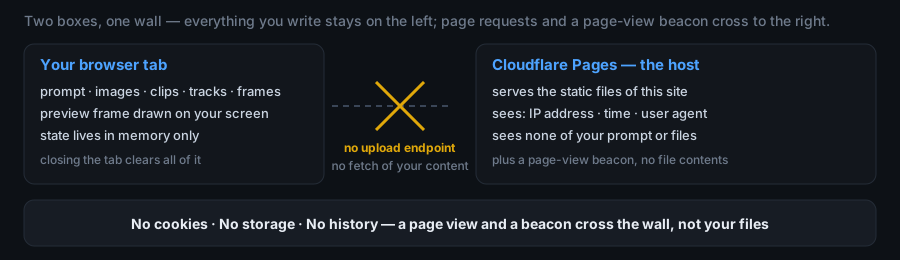
Reference images, video clips, audio tracks, the first frame and the last frame, and the prompt you write are all handled inside your open browser tab. The page draws its preview from those files on your own screen.
These files stay in your browser only. They are not uploaded to this site or to any server of ours, because this site has no upload endpoint. Closing the tab clears them.
This is not a promise in the abstract: it follows from the site's own source. The published files (index.html, app.js, styles.css and the article pages) contain no fetch(), no XMLHttpRequest, no WebSocket and no other network call that carries your content. Cloudflare adds one analytics tag at the edge; it is not in those files and the builder never calls it.
Accounts, cookies and analytics
- No account, no sign-in, no profile.
- No cookies are set by this site.
- No analytics of our own: the only analytics is Cloudflare's page-view beacon, added by the host (see below).
- No localStorage, sessionStorage or IndexedDB: the page keeps nothing on your device between visits.
What the host receives
The site is a set of static files served from Cloudflare Pages. Your browser has to request those files from that server, so the host receives the ordinary technical request data any web server receives — for example your IP address, the time of the request and your browser's user agent string — in order to return the page. That data is handled by the hosting provider under Cloudflare's own privacy policy, not collected into an account or a profile here, because there is no account system on this site.
Cloudflare also injects its Web Analytics beacon into the delivered HTML. It sends a page-view measurement to cloudflareinsights.com/cdn-cgi/rum. It is separate from the builder and the keyers, and the builder never passes it your prompt, canvas or files. Blocking static.cloudflareinsights.com stops it, and the builder and keyers keep working.
Nothing you write or upload is sent to us: there is no backend to receive it.
Advertising
The site currently runs no advertising. We may add third-party advertising in the future. If that happens, the advertising networks behind those ads may use cookies or similar technologies to choose and measure the ads you see, and their own privacy policies will apply to that processing. This page will be updated at the same time.
Changes to this policy
Any change is written onto this page together with a new "last updated" date at the top.
Contact
Privacy FAQ
How do I know nothing is uploaded — is that a promise or is it in the code?
It is in the code, and you can check it in about a minute. The three core files this site serves — index.html, app.js and styles.css — contain no fetch(), no XMLHttpRequest, no WebSocket and no other call that could carry your prompt or your files, and they load no external script. Cloudflare adds one page-view beacon at the edge; it is not in those files and the builder never passes it your content. The verification is yours to run: open DevTools, watch the Network tab while you type a prompt and attach a few references, and you will see the page request only its own static files, plus that beacon. No request carries the prompt or the files.
What happens to my prompt and files if I close the tab?
They are gone. Everything is held in the open tab's memory — the prompt string, the uploaded images, clips and tracks, and the first and last frame — and the page writes none of it to localStorage, sessionStorage, IndexedDB, cookies or any file on disk. Closing the tab drops that memory. Opening the page again starts from the defaults, so if you want to keep a job, export it before you leave: the .txt and .json downloads are the only way that job leaves this page, and they leave through your own download folder, not through us.