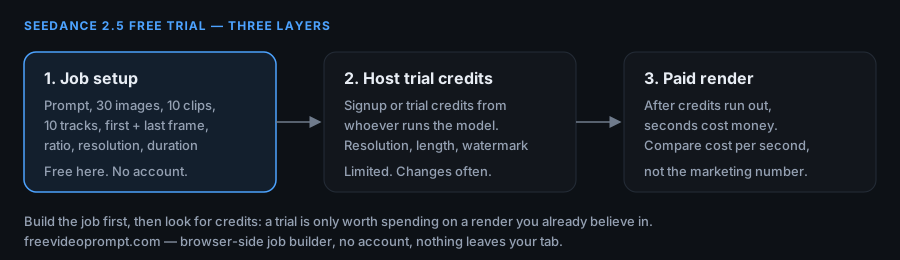
Short answer: there is no single official "Seedance 2.5 free trial" button that works the same way everywhere. What exists are three separate layers, and only one of them is guaranteed to stay free: setting up the job yourself (free here, no account, no card), whatever trial or signup credits the host that runs the model currently offers, and the render limits that host attaches to those credits. This page covers what is free, what is not, and the seven checks to run before you spend anything.
What is free, and who decides it
| Part of the job | Free? | Who decides |
|---|---|---|
| Writing and structuring the job — prompt, reference images, first and last frame, ratio, resolution, duration, sound | Yes, always | It runs in your own browser on this site. No account, no card, no ads, nothing uploaded. |
| Previewing framing before a render | Yes, always | Same page. The preview frame is drawn locally from your first and last frame. It is not an AI render. |
| The actual video render | Only if the host says so | Whoever runs the model: trial credits, signup offers, daily caps, region limits. These change without notice. |
| Watermark, resolution ceiling, clip length on a free tier | Set by the host | Usually the free tier is the one with the watermark and the shorter clip. Read the host's pricing page the day you use it. |
The honest split: the setup step is free and will stay free. The render step is free only as long as someone else's promotion says it is, and promotions move. Anyone promising you a permanent free render of a closed model is describing a promotion, not a product.
The three free layers explained
- Layer 1 — the job itself. A Seedance 2.5 job is a text prompt plus a set of references plus framing settings. Building it costs nothing and needs no sign-in. That is the layer this site handles: one screen, up to 30 reference images, 10 video clips and 10 audio tracks, one first frame, one last frame, six ratios, three durations of resolution, 4 to 30 seconds of length, then copy the prompt or download the job as .txt and .json.
- Layer 2 — host credits. Platforms that run the model sometimes hand out trial or signup credits. Treat them as a one-time sample: they usually come with a resolution ceiling, a shorter maximum clip length, and a watermark. They are useful for one serious test, not for production work.
- Layer 3 — the paid render. After the credits run out, seconds cost money. If you reach this layer with a half-tested prompt, you wasted the trial. If you reach it with a job that already survived a dry run, you buy seconds you can use.
What a free trial cannot tell you
- It cannot tell you whether the model handles your reference set — trials are usually too short to test more than one configuration.
- It cannot tell you the real cost per second, because trial credits are not priced the same as purchased credits.
- It cannot tell you what happens when a prompt is rejected for content reasons. Test that on a throwaway prompt, not on your only credit.
- It cannot tell you whether the free tier supports the resolution and duration you actually need. Check the ceiling before you plan a shot around it.
Seven checks before you spend a trial credit
- Write the whole job first. Prompt, references, first and last frame, ratio, resolution, duration, sound — all of it decided before you touch a credit.
- Read the prompt back and count the subjects. More characters and products competing in one clip is the most common reason a first render disappoints.
- Confirm the caps against what you uploaded: 30 images, 10 clips, 10 tracks, video and audio capped at 30 seconds each on this builder. If the host allows fewer, trim before you paste.
- Check the free tier's ceiling on the host's pricing page on the day you render: resolution, clip length, watermark, region. Screenshot it — these pages change.
- Do one throwaway render with a safe, simple prompt to learn where the output lands, how long it takes and what the download looks like.
- Do the real render with the job you built in step 1. One variable at a time from there.
- Convert what you got into cost per second using the formula below, then decide whether the paid tier is worth it.
Turn a trial into a number: cost per second
Trial credits are not comparable to purchased credits, so compare seconds instead. Fill this in from the host's own pricing page — it is division, not a guess:
seconds per credit = trial_credits / (cost_of_one_credit_in_money)
seconds per credit is not what you want.

what you want:
seconds_per_dollar = credits_per_dollar / seconds_per_credit_cost

practical version:
1. take the paid pack: C credits for P money
2. take the render: D seconds at resolution R
3. seconds_per_dollar = (C / credits_consumed_by_that_render) / P

if the free tier caps you at a lower resolution than you plan to ship,
run the same sum twice — once at the free resolution, once at the paid one —
and compare the two numbers, not the marketing one.
If the two numbers are far apart, the free tier is testing a different product than the one you would buy.
Seedance 2.5 free trial FAQ
Is there a real Seedance 2.5 free trial?
There is no single trial that every platform offers. What you get instead are signup or trial credits from whoever runs the model, plus the free job setup on this page. Check the host's pricing page on the day you use it, because these offers change often.
Do I need a credit card to try Seedance 2.5 for free?
Not for the setup step — this page has no account, no sign-in and no payment of any kind. Whether a host asks for a card before handing you trial credits is that host's decision, so read the signup screen before you type anything.
Is the free path different from the paid path in output quality?
Usually the free tier is capped on resolution, clip length and watermark. That means the clip you get for free may not be the clip you would ship. Run the cost-per-second sum for both tiers before you plan a shot around a free result.
Can I use Seedance 2.5 free on my phone?
The setup step, yes. This page is built for narrow screens with touch-sized controls and no horizontal scrolling, so you can build the whole job on a phone. Rendering still happens wherever the model runs, on that host's terms.
What exactly is free on this page?
The builder: prompt, up to 30 reference images, 10 video clips, 10 audio tracks, first frame, last frame, ratio, resolution, duration and sound, then copy the prompt or download the job as .txt or .json. No account, no ads, no upload — nothing you type or attach leaves the tab.
Does this page render the video?
No. No AI video is rendered here. The preview frame is drawn in your browser from your own first and last frame so you can check framing before spending a credit. The finished job is exported and pasted wherever you run the model.
Where do I see what the render actually costs?
On the pricing page of the host you render with, today. Take the credit pack price, the credits one render consumes, and the clip length it buys, then divide. The formula above does it in one pass, and it works on any host that publishes both numbers.
Next step
Build the job before you look for credits — that way a trial is spent on a render you already believe in. Open the builder, or read what this site does and does not do.