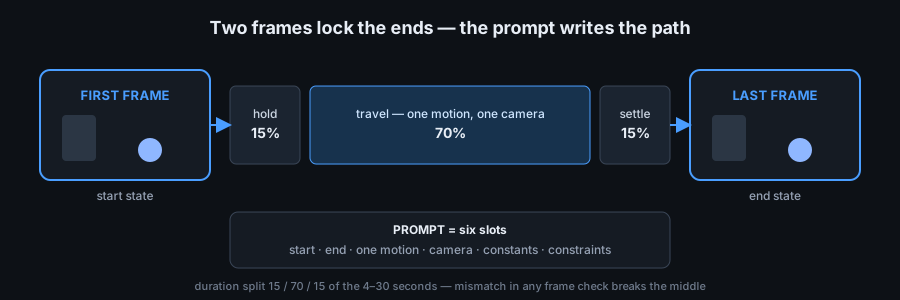
Short answer: lock the two frames first, then write the seedance prompt as the path between them — not as a fresh scene description. Both frames must share the same ratio, subject scale, camera height and light direction. The prompt then does one job: start state, one motion, end state. Preview the pair here first; it is free and takes seconds.
What the two frames decide, and what the prompt decides
A first frame and a last frame are not decoration: they override the start and the end of the clip. Whatever you put in frame one is the opening shot, whatever you put in frame two is the closing shot, and the model's only remaining task is to invent the pixels between them. Everything the frames do not pin down — the route, the camera move, the light staying constant — has to be said in the prompt, because if it is not said, it is free to change halfway through.
That is the whole failure mode in one sentence: the middle collapses when the two ends disagree and the prompt never ruled on the disagreement. Fix the pair, then write the prompt.
Six checks on the pair before you write a word
Run both frames through this table. Every row that fails is a mid-clip break waiting to happen, and every one of them is cheaper to fix now than after a render:
| # | Check | What must match | What a mismatch does mid-clip |
|---|---|---|---|
| 1 | Ratio and crop | Both frames have the same aspect ratio as the job's ratio setting (16:9 job, 16:9 frames) | A letterbox, crop or rotation jump in the first second |
| 2 | Subject scale | The subject takes about the same share of the frame in both (eyeball it: within roughly one tenth) | The subject grows or shrinks steadily, like a slow zoom nobody asked for |
| 3 | Camera height and tilt | Same lens height, same horizon line position, same tilt | The horizon slides down, the floor line migrates, the shot seems to descend |
| 4 | Key light and colour | Same side the light comes from, same time-of-day tint, same colour cast | Shadows flip side or the grade warms up halfway through |
| 5 | Location and props | Same place, same objects, nothing added, nothing removed | Props appear or vanish, a wall changes shape, a second subject shows up |
| 6 | Motion direction | The direction the first frame implies agrees with where the subject sits in the last frame | The subject teleports, reverses, or jerks at the halfway mark |
Rows 1 to 3 are geometry, row 4 is light, rows 5 and 6 are content. A pair that passes all six still needs a prompt — but it now has a middle worth writing.
The six-slot seedance prompt pattern for a two-frame job
Write the prompt in this order. Each slot is one clause; if a slot has nothing to say, the frames are not ready:
- Start state. Say frame one in words — subject, position, what it is doing at t=0.
- End state. Say frame two the same way. Two states, one sentence each, no adjectives doing a camera operator's job.
- One motion. A single verb connecting the two states: slides, rises, turns. One motion per clip — two verbs is how the middle gets torn in half.
- Camera. Either one named move (a slow slide right) or "camera locked off". Never two.
- Constants. Light direction, colour cast, style, subject identity — the things that must not change, listed as not changing.
- Constraints. "One continuous take, no cuts, no new objects, no zoom." Negative clauses are how you stop the model improvising a third frame of its own.
Where the seconds go: split the clip into three segments
The slider runs from 4 to 30 seconds, and the two frames have to be connected, not jammed together. A practical split is 15% hold · 70% travel · 15% settle: a short hold so frame one registers, the motion itself, then a short settle so frame two lands instead of snapping. Here is that split worked out for the durations people actually pick (arithmetic, not a measurement — the ratios are the rule):
| Duration you set | Start hold (15%) | Travel (70%) | Settle (15%) | What it feels like |
|---|---|---|---|---|
| 4 s | 0.5 s | 3 s | 0.5 s | One gesture — keep the motion tiny |
| 6 s | 1 s | 4 s | 1 s | A single camera move past the subject |
| 10 s | 1.5 s | 7 s | 1.5 s | The default: move with room to breathe |
| 15 s | 2 s | 11 s | 2 s | Room for one subject action plus camera |
| 20 s | 3 s | 14 s | 3 s | Long traverse; state the constants twice |
| 30 s | 4.5 s | 21 s | 4.5 s | Maximum: only if the pair passes all six checks |
The hold and settle columns are also prompt material: naming them ("holds for a beat, then moves, then settles") tells the model the two frames are anchors, not suggestions. If your pair only passes four of the six checks, drop to 4–6 seconds — a short clip has less time to drift.
When the middle still breaks: symptom, cause, prompt-side fix
| What you see halfway through | What usually caused it | What to change |
|---|---|---|
| Subject grows or shrinks steadily | Subject scale differs between the two frames | Re-shoot or re-crop the pair to match, and add "same distance, same size in frame" to slot 5 |
| Horizon drops or the camera seems to descend | Camera height or tilt differs between frames | Match the lens height, then write one camera clause in slot 4 — or "camera locked off" |
| Shadows flip side, grade warms up | Key light direction or time of day differs | Put the light in slot 5 as a constant: "window light from the left throughout" |
| Subject vanishes, or a second one appears | Background or props differ between frames | Same location for both frames, plus the "no new objects" clause in slot 6 |
| Motion reverses or jerks at the halfway mark | The two frames imply opposite directions | Name one direction and one verb in slot 3; delete every second motion word |
| A cut-looking jump with no camera move | The frames were taken in different places | There is no prompt fix for two locations — rebuild the pair |
Pre-flight checklist for a two-frame job
- Both frames carry the same aspect ratio as the job's ratio setting.
- Subject occupies about the same share of the frame in both images.
- Camera height, tilt and horizon line match frame to frame.
- Key light comes from the same side; the colour cast is identical.
- Same location, same props — nothing added, nothing removed.
- Prompt fills all six slots: start, end, one motion, camera, constants, constraints.
- Duration matches the pair's risk: short clip for a loose pair, 15/70/15 for a clean one.
- The pair was previewed together here and cut cleanly — or neither frame is used, on purpose.
- Exactly one thing will change if the first render disappoints, and it is written down.
First and last frame FAQ
How do I use Seedance 2.5 without wasting credits?
Spend nothing on the part this page covers. Build the prompt, attach both frames, set ratio and duration, and preview the pair here — the compatibility table and the preview catch the broken pairs before any host sees them. Rendering is metered wherever you run the model, so the rule is: fix the pair for free, then change one thing per rerun.
What are the common Seedance 2.5 problems, and how do I fix them?
With two-frame jobs the failures repeat: subject scale drift, horizon slides, flipped shadows, vanishing props, reversed motion, cut-looking jumps. Each one traces back to a single mismatched row in the six-check table above, and the fix table next to it says what to change in the prompt — or when the honest answer is to rebuild the pair instead of wording around it.
Is it free to use Seedance 2.5?
Building and checking the job is free on this site: no account, no card, no ads, and nothing you attach leaves the tab. The preview frame is drawn locally from your own first and last frame — it is not an AI render, and it costs nothing to run as many times as you like. The render itself is metered by whoever runs the model.
Next step
Open the builder, drop in the pair, run the six checks, fill the six slots and preview before anything is spent. For what happens after the export, read the free workflow page; for what a trial actually buys, read the free trial page.