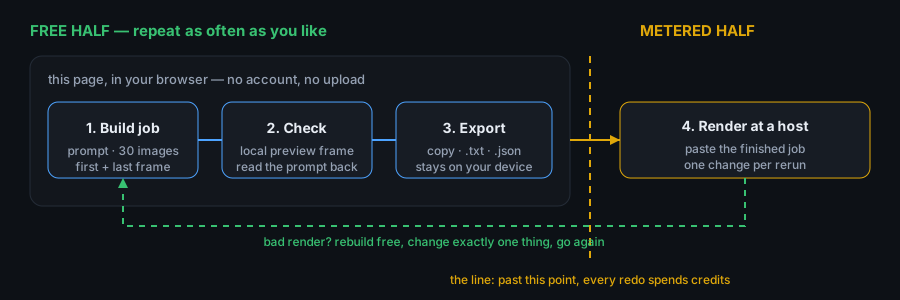
Short answer: split the job into a free half and a paid half, and finish the free half first. Write the prompt, attach references, set first and last frame, ratio, resolution and duration here, export the job as .txt or .json, then paste it into the host where you render. The build step needs no account and no card, so you can redo it endlessly before any credit is spent.
What is free in this workflow and what is not
| Part of the job | Where it happens | Costs money | Can you redo it |
|---|---|---|---|
| Writing the prompt, up to 4,000 characters | This page, in your browser | No | Unlimited, free |
| Attaching references — 30 images, 10 video clips, 10 audio tracks, 30 seconds of video and 30 seconds of audio in total | This page, files never leave the tab | No | Unlimited, free |
| First frame and last frame, with a local preview you can download as .png or .webm | This page, drawn by your own browser | No | Unlimited, free |
| Ratio, resolution, duration, sound — six ratios, 4 to 30 seconds | This page | No | Unlimited, free |
| Exporting the job as copy text, .txt or .json | This page | No | Unlimited, free |
| The render — the actual video | Whatever host runs the model for you | Only if that host says so | Every redo spends credits again |
The line sits in one place: everything before the render is free and repeatable, everything after it is metered. That is why the order matters — build, check, export, and only then go looking for seconds to spend.
The six steps
- Decide the shot on paper first. Subject, motion, start frame, end frame, length. If you cannot say the shot in one sentence, the prompt will not fix it.
- Build the whole job on one screen. Prompt, reference images, reference clips and tracks, first frame, last frame, ratio, resolution, duration, sound. Nothing is committed — the page holds it all in the open tab.
- Check framing locally before anything is spent. The preview panel is drawn from your own first and last frame in your browser. It is not an AI render, but it shows whether the two frames actually cut together.
- Export the job. Copy the prompt for a quick paste, or download
.txtfor reading and.jsonfor anything you feed into a script later. - Paste the finished job into the host you render with. The host only receives a job you have already read back and checked, not a half-thought.
- Change one thing per rerun. First render tells you what is wrong; each following render should test exactly one change.
Why one variable at a time: the arithmetic of a redo
A render that disappoints usually has several suspects: the prompt wording, the reference set, the duration, the resolution, the ratio. Change all of them between two renders and you have learned nothing about which one caused the change. With k changed items there are 2k combinations to separate; testing them in batches does not remove the need to isolate them, it only hides it. One change per render costs k renders instead of 2k:
| Things you changed | If you ever have to separate them | If you change one per render | Render spent on the wrong guess |
|---|---|---|---|
| 2 | 4 | 2 | 2 |
| 3 | 8 | 3 | 5 |
| 4 | 16 | 4 | 12 |
| 5 | 32 | 5 | 27 |
The last column is the number of paid seconds you would have burned to find out what you could have known for free, because the build side of every one of those trials costs nothing. This is pure counting, not a measurement of any host's pricing — the point is the shape of the curve, not a price.
What lands in the .txt and the .json
Both files describe the same job; they are built for different readers. Knowing the fields means you can check a job without opening the page again:
| Field | In .txt | In .json |
|---|---|---|
| Model and mode | Header line: model · text-to-video or image-to-video | model, mode |
| Prompt | Under PROMPT, verbatim | prompt |
| References | Numbered list with file names, clip lengths in seconds | references.images[], references.videos[{name, seconds}], references.audio[{name, seconds}] |
| First and last frame | Two lines, or (none) | firstFrame, lastFrame, null when unused |
| Settings | One line: ratio · resolution · duration · sound | settings.ratio, settings.resolution, settings.durationSeconds, settings.sound |
| File name | your-job.txt | your-job.json |
Two things to notice. Reference entries carry only file names and durations — the files themselves stay on your machine, so the host still needs them uploaded separately. And duration travels as a number of seconds, which means the same job can be re-read by a script without parsing prose.
Where the render happens, and what to check there
| Kind of host | What you paste in | Check before you start |
|---|---|---|
| A platform that hands out trial or signup credits | The prompt, then the references one by one | Ceiling on resolution and clip length, watermark, region, expiry of the credits. Offers move, so read the page the day you render. |
| A pay-per-render host | The same prompt and settings | Credits consumed per second at your chosen resolution, minimum and maximum clip length, refund behaviour on a failed render. |
| An app with the model built in | Whatever fields its UI exposes | Which of your settings the UI even lets you set — if it has no first-frame or last-frame slot, that part of the job has to be rebuilt in its own interface. |
| Your own script or API integration | The .json file | Field names your code expects, how references are supplied (paths, uploads or URLs), and the error responses you will get back. |
Whatever you pick, the job you hand it was finished before you arrived — which is the whole point of the free half.
Pre-render checklist
- Prompt reads back as one sentence you would say out loud, and names one subject doing one thing.
- Reference counts are inside the caps: 30 images, 10 clips, 10 tracks, video and audio each 30 seconds in total.
- Reference files are actually available to upload at the host — names in a
.txtare not files. - First frame and last frame were previewed together and cut cleanly, or neither is used on purpose.
- Ratio matches where the clip will be published; duration sits between 4 and 30 seconds for model 2.5.
- Resolution is the one you intend to ship, not the one the free tier happens to offer.
- The host's own limits for the day are read: clip length, resolution, watermark, credit expiry.
- Exactly one thing is different from the previous render, and you wrote down what it is.
Seedance 2.5 free workflow FAQ
How do I use Seedance 2.5 free end to end?
Free all the way up to the render. Build the job here — prompt, references, first and last frame, ratio, resolution, duration, sound — preview the framing locally, export it as .txt or .json, then paste it into the host where the model actually runs. Everything before that hand-off costs nothing and can be redone any number of times.
Is Seedance 2.5 free?
Building a job is free here and always will be: no account, no card, no ads, nothing uploaded. The render itself is metered by whoever runs the model, so "free" ends at the export button. This page tells you where that line is rather than pretending it is not there.
Is there a free Seedance 2.5 video generator that needs no account?
This page generates the job, not the video — no sign-up, no upload, no render. The video is produced wherever you run the model, on that host's terms. Treat any site claiming free unlimited renders of a closed model as a promotion with an end date, not as a permanent feature.
Can I run this workflow on a phone?
The build half, yes. The layout is built for narrow screens with touch-sized controls and no horizontal scrolling, and the export buttons work the same. Whether a host's render interface is pleasant on a phone is that host's business — the job file travels between devices as a download either way.
What happens to my files after I export?
Nothing. The page holds everything in the open tab until you close it: no account, no server call, no history. The .txt and .json land in your downloads folder, and the reference files stay wherever they were on your device.
Next step
Do the free half now: open the builder, run the checklist above, export the job, and only then go and find seconds to spend. For what a trial actually buys you, read the free trial page; for what credits turn into, read the 9,900-credit page.