Short answer: motion blur mixes the moving subject with the green backdrop during the exposure, so the blurred edge is green, not merely soft. In a measured 1/50 s sweep the keyer left 546 visible green pixels, 432 of them fully opaque, and turned a 16-pixel blur into a 1-pixel alpha ramp. Tolerance cannot repair that: shorten the shutter, raise softness to about 20%, then despill.
Want to try it on a still? Open the browser keyer, load a frame where the hand is moving, and start at 22% tolerance / 20% softness. The rest of this page is the measurement behind that advice.
What the shutter does to a green edge
A camera does not take an instant. It collects light for the length of the shutter, and anything that moves during that window is averaged across the pixels it crossed. On a green screen that average is not a blur in the ordinary sense: the subject is opaque, the backdrop is green, and every pixel the hand passed through records a mixture of the two. The result is a band of skin-and-green pixels, roughly as wide as the distance the hand travelled during the exposure.
To measure what a keyer does with that band I built one 800×600 frame: a static head and torso, and a hand that sweeps horizontally at 800 pixels per second, which is an ordinary gesture at this framing. I rendered the frame by averaging the hand's position across the shutter instead of drawing a fake blur, so the edge is the actual temporal mixture a sensor would record. Then I keyed every shutter setting with the exact formula this site uses: Euclidean sRGB distance from #00b140, divided by 441.67, alpha 0 below 22% and a ramp to 255 across the next 3%.
| Shutter | Hand travel during exposure | Visible green px | Fully opaque green px | Keyer alpha ramp | True blur width |
|---|---|---|---|---|---|
| 1/1000 s | 1 px | 202 | 172 | 0 px | 1 px |
| 1/500 s | 2 px | 218 | 198 | 0 px | 2 px |
| 1/250 s | 3 px | 242 | 190 | 0 px | 3 px |
| 1/100 s | 8 px | 352 | 294 | 1 px | 8 px |
| 1/50 s | 16 px | 546 | 432 | 1 px | 16 px |
| 1/25 s | 32 px | 908 | 718 | 2 px | 30 px |
“Visible green” counts pixels with alpha above 0 whose green channel exceeds both red and blue by more than 20 levels. “Fully opaque green” is the subset at alpha 240 or higher. The 202-pixel baseline at 1/1000 s is the static antialiased silhouette, not motion: a still edge always leaves a few mixed pixels. “Alpha ramp” is the number of partial-alpha pixels on one scanline through the trailing edge of the hand.
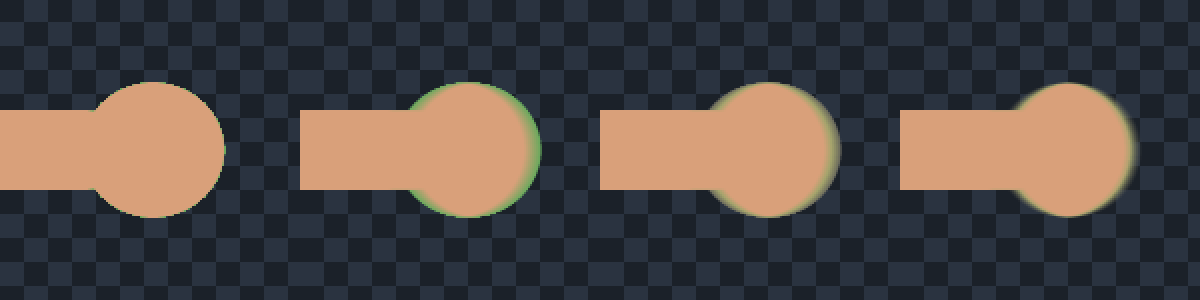
The surprising number is not the count, it is the opacity. At 1/50 s, 432 of the 546 green pixels are fully opaque. They are not a translucent veil that a higher softness can fade; they are solid pixels whose colour is a mix of skin and green, and the keyer has no reason to make them transparent because their colour is far enough from the key. That is why the ghost survives every setting that only adjusts transparency.
Why the keyer cannot see a motion blur
Tolerance and softness are measured in colour distance, not in pixels. Softness widens the band between “definitely background” and “definitely subject”, and that band has no fixed width on screen: on a hard edge it is one pixel, on a slow gradient it can be dozens. A 16-pixel motion blur is mostly a colour gradient from green to skin, but only the narrow slice of that gradient between 22% and 25% distance becomes partial alpha. The rest of the ramp is classified as fully transparent or fully opaque.
Measured on the 1/50 s frame: the true coverage ramps across 16 pixels, while the keyer's alpha crosses from 0 to 255 in 1 pixel. The mean absolute alpha error over the blurred band is 59.7 out of 255. In other words the keyer does not soften the motion blur, it chops it: the moving hand loses the smear that makes movement read as movement, and keeps a green rim where the smear used to be.
Which control actually helps
I ran the usual fixes on the same 1/50 s frame and measured each one against the true coverage. “Subject lost” counts pixels that are solid subject in the source but come out below full opacity, which is the cost of over-softening.
| Fix (1/50 s frame) | Visible green px | Opaque green px | Alpha ramp | Mean alpha error | Subject lost |
|---|---|---|---|---|---|
| None (22% / 3%) | 546 | 432 | 1 px | 59.7 | 0 |
| Tolerance 30% | 224 | 116 | 1 px | 62.4 | 0 |
| Softness 0% | 546 | 546 | 0 px | 64.3 | 0 |
| Softness 10% | 546 | 182 | 3 px | 51.5 | 0 |
| Softness 20% | 546 | 40 | 6 px | 44.7 | 0 |
| Despill after key | 0 | 0 | 1 px | 59.7 | 0 |
| Despill + softness 20% | 0 | 0 | 6 px | 44.7 | 0 |
| Despill + erode 4 px | 0 | 0 | 1 px | 118 | 7,144 |
Three things show up in that table. First, tolerance reduces the count but not the greenness: at 30% the visible green drops from 546 to 224, yet the worst remaining pixel still carries 60 levels of green excess and is fully opaque. Second, softness is the only slider that rebuilds part of the ramp: at 20% the opaque green falls from 432 to 40 and the alpha error drops to 44.7 without deleting a single solid subject pixel. Third, despill is the only step that removes the green completely, but it does not touch alpha, so on its own it turns a green rim into a dark one.
That dark rim is measurable. The worst opaque ghost pixel at 1/50 s is #6aa95c (106, 169, 92), with 63 levels of green excess over the true skin tone at that edge, #d9a07a. Despill rewrites it to #6a6a5c (106, 106, 92): the green channel drops from 169 to 106 and nothing puts the missing skin colour back, so the pixel is now darker than the edge it belongs to. A compositor fixes that by extending the solid skin colour into the edge band before compositing; a browser keyer cannot, because it only sees colour, not what is behind the pixel.
Where softness stops being safe
The same sweep shows a hard ceiling. Skin sits 51.00% away from #00b140 in this keyer's units (measured on the tolerance page). Softness extends the upper edge of the ramp to tolerance plus softness, so 22% + 20% = 42% is still below the skin distance and the subject stays solid; 22% + 30% = 52% crosses it, and the entire skin area becomes partially transparent. At 30% softness, 22,608 solid subject pixels dropped below full opacity, and the alpha error rose again to 54.7. The ceiling is arithmetic, not taste.
Practical rule from this run: keep tolerance + softness below the distance of the nearest solid subject colour by at least 5 points. On this frame that is 22% + 20%, with skin at 51%. If your subject is closer to green than that, softness is not available to you and the fix has to happen at the camera.
The order that works
- Shorten the shutter before you touch a slider. The measured cost is linear in blur width: 242 visible green pixels at 1/250 s against 546 at 1/50 s, with the true blur down from 16 px to 3 px. Three pixels of blur is small enough that the 3% softness band can express most of it.
- Key at 22% / 3% first. Judge the silhouette, not the colour, on the browser keyer. If the background clears and the body is solid, the sliders are already right; the problem is the edge.
- Raise softness to 20%, not more. It rebuilt the ramp from 1 px to 6 px and cut opaque green from 432 to 40, with no solid subject lost. Stop before tolerance plus softness reaches the nearest subject colour.
- Despill after the key. The clamp
g′ = g − max(0, g − max(r,b))took the visible green from 546 to 0 and the maximum excess from 63 to 0. Expect a darker edge afterwards; that is the honest trade, and it is why step 5 matters. The working tool is on green screen remover spill. - Judge on both white and black. A dark rim after despill is invisible on a dark background and obvious on a white one. The counting checker is on green screen remover edge check.
- Do not erode to hide the ghost. Shrinking the matte by 4 px removed the green but pushed the alpha error to 118 and deleted 7,144 solid subject pixels. It trades a colour fault for a silhouette fault.
Green screen remover motion blur FAQ
Why does the green edge only appear when my hand moves?
Because the edge is created by the exposure, not by the backdrop. A still hand has a hard silhouette: one row of antialiased pixels, which keys cleanly. A moving hand spends part of the exposure over each pixel, so the pixel records a weighted average of skin and green. The faster the move and the longer the shutter, the wider that average. On the measured frame, 1/250 s produced 3 px of travel and 1/50 s produced 16 px, and the visible green count rose from 242 to 546.
Does raising tolerance remove the green ghost from a moving edge?
Partly, and at a price. At 1/50 s, 30% tolerance cut visible green from 546 to 224 and opaque green from 432 to 116, but the worst remaining pixel still had 60 levels of green excess, and the mean alpha error rose from 59.7 to 62.4 because more of the soft edge was deleted. Tolerance moves the cut-off; it does not repaint the pixel. The green is in the RGB values, so the control that removes it is despill, not tolerance.
Is despill enough for a motion-blurred edge?
No. Despill removed every visible green pixel in the test (546 to 0, maximum excess 63 to 0) and left alpha untouched, so the edge still has the wrong shape: one pixel of ramp where the footage had sixteen. It also darkens what it fixes. The worst ghost pixel went from #6aa95c to #6a6a5c: its green channel fell from 169 to 106 and no skin colour was added back, so the edge reads darker than the subject. Use despill together with softness, and expect the edge to need a proper compositor matte for anything shown large.
What shutter speed should I use for a green screen shot?
Fast enough that the fastest thing in frame travels about three pixels or less during the exposure, measured at your delivery resolution. In this test that was 1/250 s for a hand at 800 px/s; 1/50 s let it travel 16 px and produced 2.3 times the visible green. If the shot needs long-exposure motion blur for style, accept that the blurred edge cannot be keyed cleanly with a colour-distance keyer and plan a compositor matte with motion blur applied to the alpha.
Can the browser keyer remove green from a moving MP4?
No. The keyer reads one still image and returns one PNG; it does not decode video. A frame exported from a clip is still a still frame, so you can key the worst frames to see the problem, but the moving edge has to be handled per frame or in a compositor. The video path — frame sequences, alpha containers, and which codecs keep transparency — is on green screen remover for video. The short version: the blur is already in every frame before any keyer sees it, so no export setting can undo it.
Why not just add softness until the edge looks smooth?
Because softness is a colour ramp, not a pixel blur, and it has a ceiling. On this frame skin sits 51.00% from the key colour; 22% tolerance plus 20% softness reaches 42% and keeps the subject solid, while 22% plus 30% reaches 52% and turned 22,608 solid subject pixels semi-transparent. Past that point the edge looks smooth because the whole person is translucent. Keep at least five points between tolerance plus softness and the nearest solid subject colour.
What this test is, and what it is not
It is one synthetic 800×600 frame, one motion model (pure horizontal travel, averaged across the shutter), one key formula and one set of controls. It is not a survey of real cameras, rolling shutters, optical stabilisation or codec motion compensation, all of which can change the edge. The direction is what transfers: a longer exposure widens the green band, the keyer converts most of that band into opaque green rather than partial alpha, softness rebuilds part of it up to a hard ceiling, and despill fixes hue but not shape.
The script and the raw numbers are kept with the site's working files (motion-blur-20261110.js, motion-blur-20261110.json). The four-panel image is keyer output from those frames, not an illustration. The 800 px/s hand speed is a stated assumption used to convert shutter time into pixels; at a different framing the same shutter produces a different blur width, which is why the page talks in pixels as well as fractions of a second.
Next step
Open the green screen remover, load the frame where the movement is fastest, and key it at 22% / 3%. If the body is solid and the edge is green, raise softness toward 20% and watch the silhouette; then run the despill step and compare the edge on white and on black with the edge checker. If the green band is wider than a few pixels, the cheaper fix is the next shoot: shorter shutter, same lighting.