Short answer: a wide aperture only blurs the key when it pushes the subject's own edge out of focus. Focused on the subject, f/1.8 leaves that edge sharp and merely softens the backdrop. Focus on the screen 1.5 m behind, and a 50 mm at f/1.8 spreads the edge over 16.6 px at 4K; the key then leaves an 8 px green fringe that tolerance cannot remove.
Measured 2026-11-19 with the exact colour-distance and alpha formula used by this site's browser keyer, on a synthetic 420×200 edge blurred by a circular point-spread function. Script: gsr-loop/scripts/fstop-defocus-20261119.js; raw result: fstop-defocus-20261119.json. The camera numbers are thin-lens arithmetic, not a lab measurement, and are labelled as such below.
First: which edge is actually out of focus?
“Wide aperture ruins green screen” is half true, and the half that is false is the half people act on. If the camera is focused on the subject, the subject edge is sharp no matter how wide the lens is open. What goes soft is the backdrop behind it — and a soft backdrop is easier to key, because creases, seams and small shadows get averaged away. That is the same trade the wrinkled-fabric page measures from the other side: a 2 px blur clears a crease but adds green fringe where the subject edge is also softened.
The failure needs a second condition: the subject is not where the lens is focused. That happens when the focus point lands on the screen, when the subject leans out of a very shallow depth of field, or when autofocus hunts to the high-contrast backdrop. A broadcast user on Video Production Stack Exchange describes the good half of the trade in plain words: “it does help tremendously having large aperture to diffuse the green screen (color evenness)” (Video SE 9891). He is right about the backdrop. The risk is the subject edge, which the same aperture softens the moment focus slips off it.
This is not the same problem as motion blur. There, a moving edge is averaged over the exposure time, so the smear follows the direction of travel and changes with shutter speed. Here the subject can be perfectly still and the smear is radial, set by the lens and the focus distance. The key sees a wide colour transition in both cases; the fix is different.
Measured: a 32 px blur, a 2 px matte, an 8 px green fringe
The test edge is simple on purpose: skin #d9a07a on one side, backdrop #00b140 on the other. Defocus is modelled as a circular point-spread function of diameter D, which for a vertical edge reduces exactly to a 1D convolution with the disk's horizontal chord. The blurred pixels then go through the keyer's own alphaAt() at the stated tolerance and softness. No spatial blur, no matte refinement, no despill — just the formula the browser tool runs.
| Defocus D | Matte band | Green fringe | Opaque fringe | Peak green excess | Alpha cut offset | Edge error |
|---|---|---|---|---|---|---|
| 0 px | 0 px | 0 px | 0 px | 0 | −0.5 px | 0.0 |
| 4 px | 0 px | 1 px | 1 px | 17 | −0.5 px | 0.0 |
| 8 px | 0 px | 1 px | 1 px | 40 | −0.5 px | 0.0 |
| 16 px | 1 px | 4 px | 3 px | 69 | +0.5 px | 1.6 |
| 24 px | 1 px | 5 px | 4 px | 66 | +0.5 px | 2.3 |
| 32 px | 2 px | 8 px | 6 px | 75 | +0.5 px | 3.0 |
The first surprise is the matte: 32 px of optical blur produces a 2 px alpha band. That is not a bug. This keyer is a threshold on colour distance, not a deconvolution. Every pixel whose mixture is more than 25% away from the backdrop (22% tolerance plus 3% softness) becomes fully opaque; every pixel closer becomes fully transparent. The transition in colour is wide, but the transition in alpha stays narrow. The second surprise is where the green goes: it survives on the opaque side of that narrow cut, as a rim of original mixed pixels that no tolerance can make transparent without also deleting subject pixels.
| Offset | −8 | −6 | −4 | −2 | −1 | 0 | +1 | +2 |
|---|---|---|---|---|---|---|---|---|
| Green excess | −7 | 10 | 27 | 45 | 55 | 65 | 75 | 83 |
| Alpha | 255 | 255 | 255 | 255 | 255 | 208 | 30 | 0 |
Read the two rows together. At offset −1 the pixel is fully opaque and still carries 55 levels of green; at offset +1 it is 88% transparent and the green is almost gone. The cut happens inside one or two pixels. That is why the composite shows a green rim with a hard outer edge instead of a gentle fade.
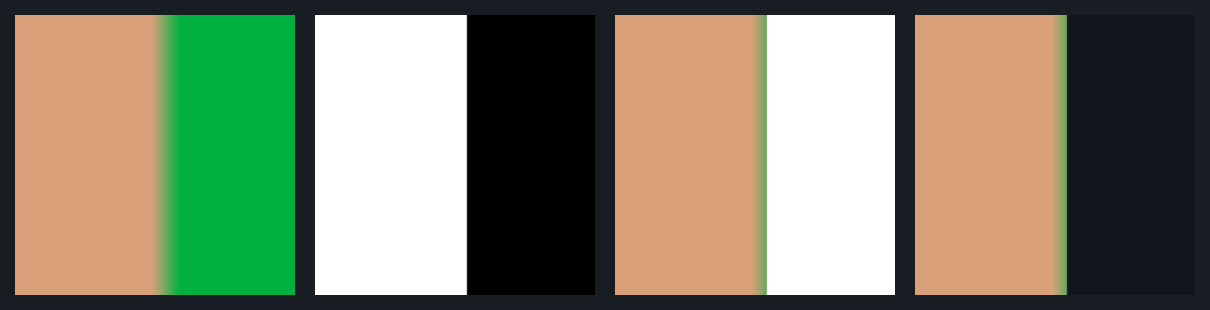
Tolerance moves the cut; it does not undo the blur
The obvious repair is to push tolerance until the green rim disappears. It does remove green pixels — by moving the cut further into the subject. The table below is the same 32 px edge at three settings.
| Setting | Matte band | Green fringe | Opaque fringe | Cut offset | Edge error |
|---|---|---|---|---|---|
| 12% / 8% | 4 px | 13 px | 9 px | +4.5 px | 15.1 |
| 22% / 3% (default) | 2 px | 8 px | 6 px | +0.5 px | 3.0 |
| 30% / 3% | 2 px | 4 px | 2 px | −3.5 px | 9.3 |
At 30% the visible fringe halves, from 8 px to 4 px, but the cut moves 3.5 px into the skin and the edge error triples. At 12% the fringe grows to 13 px: a tighter tolerance protects a 50/50 hair edge (17.75% from the key), but on a defocused boundary it leaves more of the mixed band opaque. Neither setting restores the edge, because the information that would restore it — which part of each pixel came from the subject — is not in the frame any more.
Softness does not help either. On this keyer, softness is a ramp on the colour distance, not a blur radius in pixels; the edge-check page uses the same property from the other direction. It changes which mixed pixels are semi-transparent, but it cannot widen the matte to match a 32 px optical transition. A spatial matte blur would widen the band, and would also destroy every real 1–2 px hair edge in the same frame.
What the f-stop actually changes
Three camera numbers decide how many pixels of defocus a wrong focus plane costs: focal length, f-number, and the distance between subject and screen. The table is thin-lens geometry for a 36 mm full-frame sensor written to 3840 px, with the subject at 3 m and the screen 1.5 m behind, focus accidentally on the screen.
| Lens | f/1.4 | f/1.8 | f/2.8 | f/4 | f/5.6 | f/8 | f/11 | Stop for 4 px |
|---|---|---|---|---|---|---|---|---|
| 35 mm | 10.5 | 8.1 | 5.2 | 3.7 | 2.6 | 1.8 | 1.3 | f/4 |
| 50 mm | 21.4 | 16.6 | 10.7 | 7.5 | 5.4 | 3.7 | 2.7 | f/8 |
| 85 mm | 62.3 | 48.5 | 31.2 | 21.8 | 15.6 | 10.9 | 7.9 | f/22 (21.8) |
An 85 mm at f/1.8 is 48.5 px of subject blur in this geometry, and even f/11 is still 7.9 px. The f-number that would reach 4 px is 21.8 — technically f/22, but by then diffraction and light loss are working against you. The practical answer for a long lens is not a smaller aperture, it is to focus on the subject and keep it there.
Depth of field is the other half of the number. It says how much subject movement the chosen stop tolerates before the edge starts to soften at all.
| f-number | Near | Far | Total |
|---|---|---|---|
| f/1.4 | 2.86 m | 3.16 m | 30.3 cm |
| f/1.8 | 2.82 m | 3.21 m | 39.0 cm |
| f/2.8 | 2.73 m | 3.34 m | 61.0 cm |
| f/4 | 2.62 m | 3.50 m | 88.0 cm |
| f/5.6 | 2.50 m | 3.75 m | 125.6 cm |
| f/8 | 2.33 m | 4.21 m | 187.4 cm |
| f/11 | 2.15 m | 4.95 m | 279.3 cm |
- Focused on the subject, a 50 mm at f/1.8 is safe for a still subject. It gives 39 cm of depth at 3 m, so a 20 cm lean still keeps the edge sharp. The backdrop 1.5 m behind sits 16.7 px out of focus, which smooths creases and costs the key nothing.
- Focused on the screen, the same lens is the worst case in the table. The subject is 1.5 m away from the focus plane, outside a depth of field that only spans 4.10–4.98 m. No key setting gets the sharp edge back.
- An 85 mm at f/1.8 gives only 13.5 cm of depth at 3 m. A 10 cm lean toward the camera is already more than half the band. If the shot needs a long lens, focus on the eyes and lock it, or accept a soft edge.
- Stopping down helps only while the subject stays at the same distance. f/5.6 gives 1.26 m of depth and 5.4 px of subject blur in the wrong-focus case. It does not fix a focus plane that is on the backdrop; it just makes the error smaller.
Run your own numbers: defocus calculator
Enter the lens, the stop, where the camera actually focused, where the subject is, and where the screen is. The calculator returns the blur diameter in output pixels, the depth of field, and how much visible green fringe the measured 22%/3% key would leave. It is arithmetic on your inputs, not an analysis of your footage.
Depth of field uses a 0.03 mm circle of confusion, the usual full-frame convention; the 4 px limit is a starting point measured on this keyer, not a law. Fringe is estimated at one quarter of the subject blur, the ratio the 22%/3% row showed from 4 to 32 px. The calculator cannot see your lens, your sensor or your actual focus point — it only does the geometry.
If you cannot reshoot
- Confirm the cause at 100%. A defocused edge shows a wide colour transition but a narrow matte. Put the matte and the composite side by side; if the alpha band is 1–4 px while the colour transition is 10–30 px, tolerance is not the problem.
- Despill the rim before anything else. The rim is real colour, not alpha, so the alpha-preserving clamp on the spill page removes the green without changing the silhouette. It will not make the edge sharp, but it removes the most visible part of the defect.
- Do not push tolerance past the material limit. At 30% the cut moved 3.5 px into skin and the edge error went from 3.0 to 9.3. If the subject wears green or has fine hair, that trade is worse than the fringe.
- Roto or refine only where the shot needs it. A defocused silhouette has no hidden detail to recover; a manual or AI matte can redraw a plausible edge, but it is inventing the boundary, not measuring it. Price that per frame before committing a sequence.
- For a still, key a sharp frame instead. If the same setup has a sharp reference frame, key that one with the browser keyer and use the blurred frame only for the background. For a clip, the still-frame limit and the frame-sequence route are on the video page.
Check your own frame
- Zoom to 100% on the edge. Measure the colour transition and the alpha transition separately; if they differ by more than about 4×, the lens is the cause.
- Count fully opaque pixels with green excess above 8. On the 32 px model that is 6 px at 22%/3%, and those pixels are not removable by tolerance without eating subject.
- Check the focus plane in the shot: eyes sharp and backdrop soft is the good case; backdrop sharp and eyes soft is the failure this page measures.
- Run the calculator with the real focus distance, not the intended one. A focus pull that ends on the screen is a 16.6 px error at 50 mm and f/1.8.
- Compare 22%/3% and 12%/8% on a still. Pick the setting with fewer visible green pixels at 100%, not the one that looks cleaner in a fit-to-window preview.
- Check the result on white and on a dark background. The same rim can disappear on one and read as a hard green line on the other.
Green screen remover and f-stop FAQ
Does a wider aperture make green screen keying worse?
Only if it puts the subject edge out of focus. With focus on the subject, a wider aperture blurs the backdrop and leaves the subject edge sharp; that is usually better for the key, because creases and small shadows are averaged away. The measured failure starts when the subject leaves the focus plane: a 50 mm at f/1.8 focused on a screen 1.5 m behind a subject at 3 m spreads the subject edge over 16.6 px at 4K, and the 22%/3% key then leaves 4 px of visible green fringe at that blur diameter (8 px at 32 px of defocus). The aperture is not the villain; the focus plane is.
Why is the matte edge sharp when the picture edge is soft?
Because the key is a threshold on colour distance, not a reconstruction of the edge. On the 32 px defocus test the matte band was 2 px: pixels with more than 25% colour distance became fully opaque, pixels with less became fully transparent. The wide optical transition is still in the RGB values, and the pixels on the opaque side of the cut show it as a green rim. A spatial matte blur would widen the band, but it would also soften every genuine 1–2 px hair edge in the frame, which is why the browser keyer does not do it.
Can edge softness fix an out-of-focus subject?
No. On this keyer, edge softness widens the alpha ramp over colour distance, not over pixels. In the 32 px test, changing 22%/3% to 12%/8% moved the matte band from 2 px to 4 px while the visible green fringe grew from 8 px to 13 px; changing to 30%/3% cut the fringe to 4 px but moved the cut 3.5 px into the subject. Softness changes which mixed pixels are semi-transparent, not how much of the frame the lens mixed. The only real fixes are focus, a smaller aperture, or a matte that is drawn rather than measured.
What f-stop should I use for a green screen?
Focus on the subject first, then pick the stop that keeps the subject inside the depth of field for the whole take. At 50 mm and 3 m, f/1.8 gives 39 cm, f/2.8 gives 61 cm and f/5.6 gives 1.26 m. For a still subject, f/1.8 is fine and gives the softest backdrop. For a subject who leans or walks, f/2.8 or f/4 is a better bet. Do not open up “for the key” and then focus on the screen: that combination is the one measured here, and f/8 is the first common stop that brings a 50 mm setup back to 4 px of subject blur.
Does a long lens make the edge worse?
At the same subject and screen distances, yes, sharply. With the subject at 3 m and the screen at 4.5 m, 35 mm at f/1.8 gives 8.1 px of subject blur, 50 mm gives 16.6 px, and 85 mm gives 48.5 px. The 85 mm would need f/21.8 to reach 4 px, which is past the point where diffraction and light loss make the shot practical. A long lens is still usable; it just leaves much less room for a focus error, and its depth of field at f/1.8 is only 13.5 cm at 3 m.
Next step
If the edge is sharp and the problem is colour, the browser keyer will show you the matte on a checkerboard without uploading the frame. If the fringe is already in the pixels, go to spill removal; if you need a count instead of an opinion, use the edge checker.