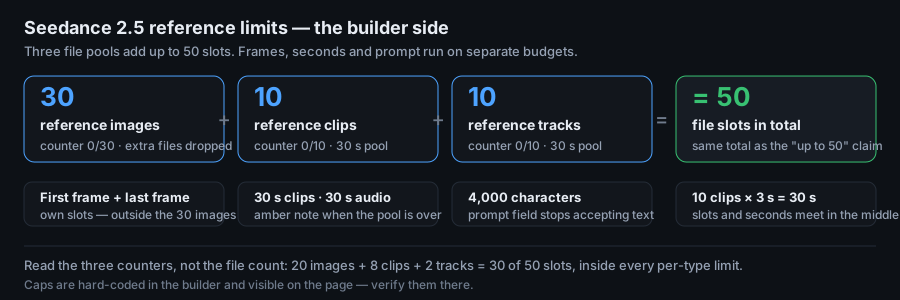
Short answer: a Seedance 2.5 job takes 30 reference images, 10 reference clips and 10 reference tracks — 50 file slots in total — plus one first frame and one last frame that sit outside that count. Video and audio are each capped at 30 seconds in total, and the prompt stops at 4,000 characters. Fill the slots by role, not by count.
Where the two numbers come from
You will meet two figures on the same question. One is printed by a tool you can operate; the other is printed by pages describing the model. They are not in conflict, but they count different things:
| Source of the number | The figure it prints | What it counts | What it leaves out |
|---|---|---|---|
| The builder on this site | 30 images + 10 clips + 10 tracks | Files, in three upload boxes, each with its own live counter | First frame, last frame, prompt text and the seconds totals |
| Reference guides for the model | Up to 50 inputs | A mixed bag: images, video, audio and written text | No per-type ceiling, no seconds ceiling |
| Model-launch posts on Reddit | Up to 50 references, 30-second takes | The same headline figure, repeated without a breakdown | How the 50 split across file types |
Now the part nobody prints. Add up what the builder allows:
The two routes land on the same total of 50 — one counted per file type, one counted as a single mixed allowance. That equality is arithmetic on published caps, not a claim that they are the same 50: the guides' 50 includes written text, while here text lives in its own 4,000-character prompt field and never touches the file slots. Practical consequence: stop counting files and start reading the three counters. A job that uses 20 images, 8 clips and 2 tracks is at 30 of the 50 slots and fully inside every per-type limit, while a job at 30 images alone is already at its image ceiling with two-thirds of the slots unused.
What the builder enforces, line by line
Each limit below is a hard-coded constant, so the failure behaviour is fixed and reproducible. Knowing what happens when you cross a line tells you which limit you actually hit:
| Limit | Where you see it | What happens when you cross it |
|---|---|---|
| 30 reference images | Counter above the thumbnails, 0/30 | Files past the free slots are dropped; the status line reads Reference images capped at 30. N skipped. |
| 10 reference clips | Counter on the video box, 0/10 | Same drop behaviour: Capped at 10 files. N skipped. |
| 10 reference tracks | Counter on the audio box, 0/10 | Same drop behaviour, counted per box, not across the job |
| 30 s of clips in total | Note under the upload boxes | Note turns amber and appends the running total, e.g. video references total 34.0s |
| 30 s of audio in total | The same note | Amber again, with the audio total named the same way |
| 4,000 characters of prompt | Counter beside the prompt | The field stops accepting characters; the counter reads 4000/4000 |
| First frame and last frame | Two single-choice slots | They never consume image slots — they are separate fields and the export lists them on their own lines |
Two behaviours are worth singling out. The image and clip caps are enforced by silently discarding whatever does not fit, so a drag-and-drop of 40 photos gives you 30 and a message — not an error. The seconds caps are enforced by warning only: nothing is removed, which means an over-limit job can still be built and exported, and the overrun only shows in the amber note if you look at it.
The seconds ceiling is the real budget
"10 clips" sounds like ten full clips. It is not. Clips share one 30-second pool, so the slot count and the seconds ceiling meet in the middle — divide the pool by the slots you plan to use:
| Clips you attach | Average clip length that fits the 30 s pool | What that buys |
|---|---|---|
| 1 | up to 30 s | One full-length motion reference for a maximum-length job |
| 2 | 15 s each | Two movements, or one movement plus one camera path |
| 3 | 10 s each | Start, middle and end beats of the shot |
| 4 | 7.5 s each | Scene beats with short transitions |
| 5 | 6 s each | Five gestures — the practical ceiling for varied motion |
| 10 | 3 s each | All slots used, all clips reduced to snippets |
The audio pool works the same way: ten tracks at three seconds each, or one 30-second ambience bed. If you attach a 20-second motion reference, the remaining nine clip slots share ten seconds between them. Pick the pool split before you upload — the builder shows the running total under the boxes, so you can see the budget drain as you add files.
Spending the slots: three budgets that fit
Nobody needs 50 files on the first attempt. These are three allocations, each written for a job type, each inside both the per-type caps and the seconds pools (clip column assumes the 30 s pool is divided across the clips listed):
| Job type | Images | Clips | Tracks | Slots used | What each group does |
|---|---|---|---|---|---|
| Character scene | 10 | 5 | 5 | 20 of 50 | Identity, outfit and location stills; one motion clip per beat; ambience plus a timing bed |
| Product ad | 8 | 6 | 6 | 20 of 50 | Front, side and detail stills; one orbit clip; room tone, hit and logo sting |
| Style-led short | 6 | 8 | 6 | 20 of 50 | Two style frames plus location; camera moves as clips; music and foley |
| Full load | 30 | 10 | 10 | 50 of 50 | Only when you can name a job for every single file in the prompt |
The last row is the trap: 50 of 50 is a ceiling, not a target. A file you cannot justify in one prompt clause is a file that competes with the ones you can. Add a reference only when it removes an ambiguity the current set still has — that rule keeps the set debuggable when a render comes back wrong.
Before you press Build output
- Image counter at or below 30, clip counter at or below 10, track counter at or below 10.
- Note under the uploads is not amber — clip seconds total ≤ 30, audio seconds total ≤ 30.
- Prompt counter below 4000 characters, so nothing was cut off at the field.
- First frame and last frame are chosen on purpose, and you know they sit outside the 30-image count.
- Every attached file has a role you can state in one prompt clause.
- One primary file per role — no second image quietly contradicting the first.
- Clip lengths divided across the pool before upload, not discovered afterwards in the amber note.
- Export as .txt and check that the REFERENCES list comes out in the same order your prompt assigns roles.
Reference limits FAQ
Which caps does the builder enforce — images, clips, audio?
Three file caps and two seconds caps: 30 reference images, 10 reference clips and 10 reference tracks, plus 30 seconds of clips in total and 30 seconds of audio in total. The prompt has its own ceiling of 4,000 characters, and first frame plus last frame are separate single slots that do not use the image cap. Each upload box shows its own live counter, so you can read the state of all three without counting files.
How many seconds of reference video can one job carry?
Thirty seconds of clips in total, and thirty seconds of audio in total — two separate pools, not one shared one. The pools are independent of the slot counts, so 10 clips can be ten 3-second snippets or one 30-second reference; the builder shows the running total under each upload box and turns the note amber the moment it passes 30.0s. Split the pool before you attach anything: a single 20-second motion reference leaves ten seconds for the other nine clip slots.
Does the first frame count towards the 30 images?
No. The first frame and the last frame have their own single-choice slots and their own state, and neither is added to the 30-image counter — you can attach 30 reference images and still set both frames. The export treats them as separate lines as well: images appear in the REFERENCES list, the frames get their own FIRST FRAME and LAST FRAME entries (or their own fields in the .json).
Next step
Open the builder, watch the three counters as you attach files, and keep the amber note clean before you export. For what happens to the exported job afterwards, read the free workflow page; for how a reference-heavy job is priced, read the credits page; for the two-frame slots used alongside references, read the first and last frame guide.